


Holman Insights
4.4132.00 Reviews
App Specs
- Version
- 9.0.8
- Updated On
- License
- Free
- Downloads
- 50,000+
- Developer
- Holman
- Categories
- Auto & Vehicles
- Platform
- Android
Screenshots
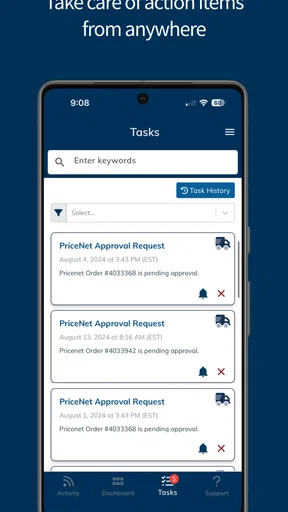
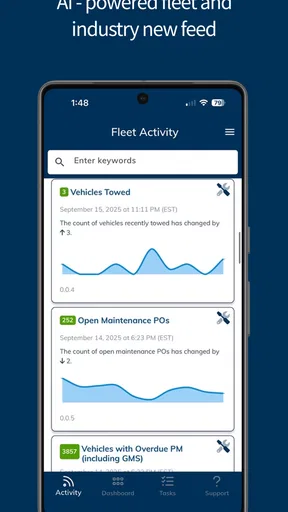
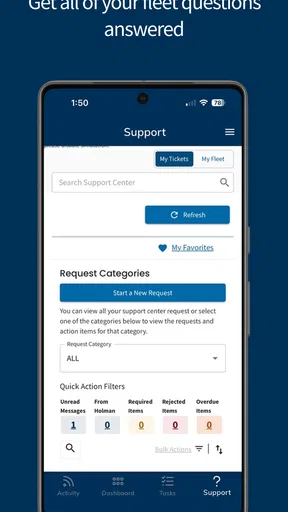
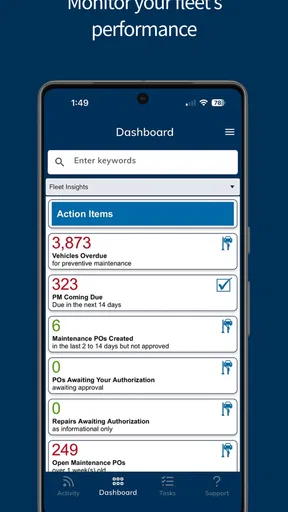
 Analysis by AppCompare
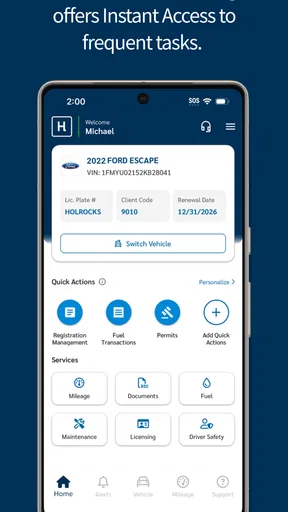
If your vehicle is managed through Holman, Holman Insights is designed to turn the everyday details of ownership into one place you can check from your phone. I found its main appeal less in flashy presentation and more in the practical questions it helps answer: how far the vehicle has travelled, when maintenance needs attention, whether licensing details are current, how fuel use is being recorded, and what is happening with vehicle-related orders.
That makes it a very different kind of automotive app from a navigation tool, a fuel-price finder, or a generic service reminder. It is tied to a Holman-managed vehicle, so its usefulness depends heavily on whether your vehicle information is connected to the service. For the right driver, that connection can remove a surprising amount of routine checking. For someone looking for a universal car logbook, it is a less natural fit.
What to expect from Holman Insights
Holman Insights is a free Auto & Vehicles app from Holman. It has been available since January 4, 2017, and the current version is 9.0.7. The app is suitable for Everyone and runs on Android 8.0 or later, which means many older Android phones can still use it without needing a recent device.
The public response is encouraging rather than overwhelming: it holds a 4.4 average from around 1.8 thousand ratings, with more than a hundred written reviews, and has passed 50 thousand installs. I would read those figures as evidence that the app is useful to a defined audience, not as proof that it will suit every driver. Its value comes from the Holman relationship behind the vehicle information.
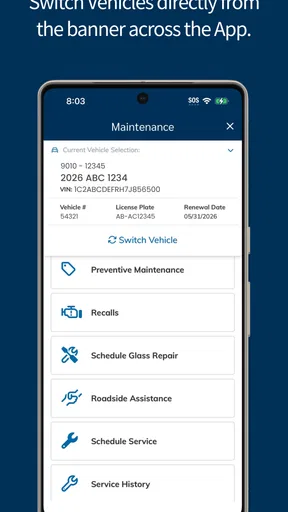
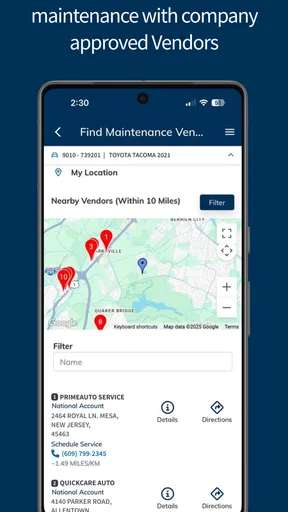
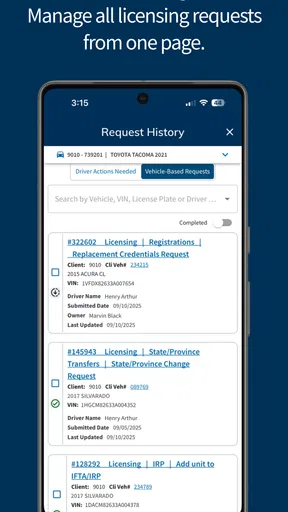
On opening the app, I would expect the most useful information to be organized around the vehicle rather than around general motoring advice. Mileage, maintenance, licensing, fuel, and orders are the important areas. That focus is helpful because it keeps the experience close to real administrative tasks. You are not opening it to browse articles or compare cars; you are opening it to check something connected to your vehicle.
A first-time user should also set expectations around timing. An app like this is most useful when the underlying vehicle record is kept current. If you have just completed a service, refuelled, changed vehicles, or are waiting for an order to progress, the information you see may depend on when those details have been recorded in the connected system. I would treat the app as a convenient view into vehicle management, not as a replacement for every conversation with a service provider or fleet contact.
The strongest use case is a driver who wants fewer scattered reminders. Instead of keeping mileage in one note, licensing information in another place, fuel receipts in a wallet, and order updates in messages, the app gives those topics a shared home. That does not make the underlying responsibilities disappear, but it makes them easier to revisit when you are already holding your phone.
Worth Reading Before You Choose

EA SPORTS FC Mobile 26 Is a Bigger Football Game, but It Takes Time

Flipboard Shows What News Apps Must Do Beyond the Feed

Switching to Android Auto Means Rethinking Your Driving Routine

Google Calendar Makes a Crowded Week Easier to Manage

Ludo King Makes the Most of the Minutes Between Plans

Baby Panda World Brings Quick Play to Modern Phones, but Its Game Library Feels Busy
Who will get the most from it
I think Holman Insights makes the most sense for people driving a Holman-managed vehicle, especially anyone who regularly needs to check administrative or maintenance information while away from a desk. A driver who shares responsibility for a vehicle with an employer or fleet team may find the centralized view particularly useful, because it reduces the need to remember which detail belongs in which system.
It can also help a busy driver prepare for a service conversation. Before calling about maintenance, I would first check the mileage and review the relevant vehicle information in the app. That simple habit can make the conversation more precise: instead of saying that the car “probably” needs attention, you can start with the information shown for that vehicle.
On the other hand, I would skip it if you want a standalone app for any privately owned car. A universal maintenance tracker may be better when you need to enter your own service history, store receipts, track several unrelated vehicles, or create reminders without relying on a Holman connection. The same is true if your main need is turn-by-turn navigation, roadside assistance, fuel-price discovery, or trip recording. Those are different jobs.
Getting from installation to a useful first check
I’d make the first check a small, deliberate routine rather than trying to explore every screen at once: confirm that you are looking at the intended vehicle, then compare its mileage with the odometer. That gives you a practical reference point for the maintenance information and helps you judge whether the connected record is useful for your needs. From there, the next section looks at how to turn that first check into a repeatable habit.
Start with the vehicle relationship, not the menus
After installing the app, my advice would be to think first about which vehicle or Holman account it is meant to represent. The first meaningful success is not simply reaching the home screen. It is confirming that the vehicle information you expect to use is actually available and recognizable.
Use the account details associated with your Holman vehicle arrangement and take a moment to read each setup screen rather than tapping through automatically. If the app presents more than one vehicle or vehicle-related area, identify the correct one before interpreting mileage, maintenance, or licensing information. This is a small step, but it prevents a common real-world mistake: checking a valid record that belongs to the wrong vehicle.
I would also recommend completing setup when you have a few quiet minutes, rather than while standing beside the car in a hurry. You may want to compare what the app shows with the vehicle you are about to drive. That comparison gives you an immediate confidence check and makes it easier to notice whether the displayed details match your expectations.
Because this is a connected vehicle-management tool, the first setup experience may feel less like configuring a generic utility and more like identifying yourself within an existing service. That is a strength when the connection works, but it also explains why the app is not equally useful to everyone. The important question is not only whether the app installs; it is whether your vehicle record is available through Holman.
The first successful action I would choose
Once the vehicle is visible, I would begin with mileage. It is an easy reference point and gives you a practical reason to return to the app. Check the displayed figure against the vehicle’s current odometer, then use that knowledge to understand the maintenance information shown alongside it. This creates a useful chain: identify the vehicle, verify the mileage, and then interpret the service status with that context.
That workflow is more reliable than opening every area at random. Mileage is familiar, maintenance is action-oriented, and together they show whether the app is giving you information that can guide a real decision. If the figures and vehicle identity make sense, you have already achieved more than simply signing in.
A second useful first action is checking licensing information before an important journey or before handling vehicle paperwork. Licensing is the kind of detail people often remember only when a deadline is close. Making it part of your first review helps you see whether Holman Insights can serve as a regular checkpoint rather than an app you open only after something has gone wrong.
For fuel, I would use the app as a record to review patterns or confirm entries, not as a substitute for keeping receipts when those receipts matter for reimbursement or accounting. The practical benefit is consistency. If you check fuel information at the same time as mileage, the two areas become more meaningful together than either one viewed in isolation.
Orders deserve a similar approach. If you are waiting for something connected to the vehicle, look at the order area when you need an update, but do not assume that opening the screen changes the order itself. The app is most valuable here as a visibility tool. It helps you know what information is available before you decide whether a separate follow-up is necessary.
A realistic everyday routine
Imagine finishing a workday and noticing that the vehicle is approaching the mileage at which maintenance usually becomes relevant. Instead of searching through old messages, you open Holman Insights, select the vehicle, check the mileage, and review the maintenance area. You then look at licensing because you are planning a longer trip next week. Finally, you glance at fuel and any open order connected to the vehicle.
That routine takes advantage of the app’s breadth without turning it into a constant chore. The key is to use one visit to answer several related questions. I would not open each section repeatedly throughout the day. I would use the app as a short vehicle-admin check, especially before travel, before contacting a fleet team, or when a service decision is approaching.
There is also a useful handoff benefit. If another person is responsible for the vehicle, checking the same information before discussing it can reduce vague back-and-forth. You can say which area you checked and what prompted your question. The app does not remove the need for communication, but it can make that communication more focused.
Confusion points worth knowing early
The first likely confusion is assuming that every feature behaves like a personal notebook. Holman Insights is not simply a blank space where you enter anything you want. Its central purpose is to show information associated with a Holman vehicle, so the experience may feel limited if you expect complete manual control over every record.
Another point is the difference between seeing information and changing the underlying vehicle record. A screen showing mileage, licensing, maintenance, fuel, or orders does not automatically mean that every item can be edited from the phone. I would check the available controls carefully and avoid treating a displayed value as something you can correct casually. When accuracy matters, use the appropriate Holman or fleet contact route as well.
Users may also wonder why a recent event is not immediately reflected. Vehicle administration often involves information being recorded elsewhere before it appears in an app. If you have just refuelled, attended maintenance, or discussed an order, give the record time to reflect the event and compare the information again later. If the issue affects safety, legal compliance, or an urgent service need, do not wait for the app to become your only source of confirmation.
A further source of confusion is the role of mileage. It is tempting to treat one displayed number as a complete maintenance decision, but mileage is only one part of vehicle care. I would use it to orient myself, then read the maintenance information and consider the vehicle’s actual condition and any instructions from the responsible service team.
Finally, people often expect an automotive app to work equally well for every vehicle. This one is more specialized. Its focused design is a benefit when your vehicle is within the Holman system, but it is also the main trade-off. If you change to a vehicle outside that relationship, a general-purpose maintenance app may offer more continuity.
Three practical habits that improve the experience
- Verify the vehicle before acting on a detail. When more than one vehicle is associated with your access, make vehicle selection the first step. A correct maintenance or licensing value is still unhelpful if you are viewing the wrong record.
- Pair mileage with maintenance instead of checking them separately. Mileage gives context, while the maintenance area gives the more relevant reason to take action. Reviewing them together is a better habit than relying on an odometer figure alone.
- Use the app before making a call, not after. Checking licensing, fuel, orders, or maintenance first can help you ask a narrower question and avoid repeating information already visible in the vehicle record.
These habits also reveal the app’s main limitation: it rewards users who treat it as a connected information hub. It is less satisfying for someone who wants a highly customizable journal of every personal vehicle expense, repair note, or trip. In that situation, a dedicated logbook may provide more control, even if it requires more manual work.
How it compares with familiar alternatives
Compared with a paper notebook, Holman Insights is easier to consult when you are away from home and more closely connected to vehicle-management information. A notebook can hold handwritten notes and receipts, but it cannot provide the same single-screen relationship between mileage, maintenance, licensing, fuel, and orders. The notebook’s advantage is flexibility; the app’s advantage is consolidation.
Compared with a generic maintenance reminder app, Holman Insights feels narrower but potentially more relevant for its intended users. Generic tools are often better when you want to create your own service intervals, add custom repair notes, or manage vehicles from different sources. Holman’s approach is more useful when you want to view information associated with a Holman-managed vehicle without building that record from scratch.
Compared with a fleet portal on a computer, the phone app is more convenient for quick checks. You can review vehicle information during the normal moments when questions arise, rather than waiting until you are back at a desk. The trade-off is that a mobile view may feel less suitable for detailed administration or long comparisons. I would use the app for awareness and quick verification, then use the appropriate broader process for complex changes.
It also differs from navigation and fuel-discovery apps. Those tools help you move through a journey or find a place to refuel; Holman Insights helps you understand the administrative state of the vehicle. Installing it will not replace those apps, and that is not a weakness so much as a reminder to judge it by the job it is built to do.
Privacy, access, and practical expectations
Before relying on the app, I would make sure the account belongs to the person who should access the vehicle information. Vehicle mileage, licensing, maintenance, fuel, and order details can be sensitive in a work or shared-vehicle setting. Good account habits matter just as much as the app’s convenience: use your own access, lock your phone, and sign out or secure the device if other people regularly use it.
The Everyone content rating makes the app broadly approachable from an age-classification perspective, but that does not mean every vehicle-management arrangement is identical. Your practical access still depends on the Holman relationship connected to the vehicle. This is another reason to confirm the correct vehicle and account during setup rather than assuming that installation alone grants a complete view.
I also appreciate that the app is free to download and use. That removes a barrier for someone who already needs the Holman service, although “free” does not turn it into a universal vehicle-management platform. The real value comes from whether the information you need is available through your connected vehicle record.
When I would recommend it—and when I would not
I would recommend Holman Insights to a driver who wants a straightforward mobile checkpoint for a Holman vehicle. The combination of mileage, maintenance, licensing, fuel, and orders gives it a practical range, and the phone format makes those details easier to consult during ordinary routines. I especially like it for people who tend to lose track of administrative details until a deadline or service question appears.
I would be more cautious about recommending it to a private car owner who has no Holman connection, someone managing a mixed collection of vehicles from different providers, or a driver looking for detailed manual record-keeping. Those users may prefer a general maintenance tracker, a spreadsheet, or a fleet platform with broader editing and reporting tools.
My final advice is to judge the app after one complete check rather than after installation alone. Confirm the vehicle, compare the mileage, review maintenance, inspect licensing, and then look at fuel or orders if they are relevant to your situation. If that sequence gives you a dependable picture of the vehicle, the app is doing its job. If you still need to search several unrelated places for every answer, its specialized connection may not match the way you manage your car.
Overall, Holman Insights is a focused and sensible companion for the Holman vehicle it is connected to. It does not try to be every kind of automotive app, and that is exactly why it can be useful. Its best feature is the reduction of everyday vehicle-admin friction: one mobile place to begin checking the details that influence maintenance, compliance, fuel records, and orders. I would install it when Holman manages my vehicle, use it as a regular verification step, and keep a broader tool only if I needed records or vehicles outside that ecosystem.
Pros
- Clear insights help identify plant watering trends quickly.
- Useful for monitoring water usage across connected irrigation systems.
- Data can support more informed seasonal watering decisions.
- Remote access makes checking system performance convenient.
- Helpful for spotting unusual irrigation activity early.
Cons
- Requires compatible Holman hardware to provide meaningful data.
- Insights may be limited if sensors or controllers lose connection.
- Some users may find irrigation analytics difficult to interpret.
- Reports depend on accurate setup and correctly configured zones.
- Continuous monitoring may require reliable internet access.
FAQs for Holman Insights
What is Holman Insights, and who is it designed for?
Holman Insights is a business-focused mobile application intended for authorized users who need access to company information, operational updates, reports, or performance insights while away from a desktop computer. Its exact tools and content may depend on the organization using it, so the experience can vary between users. It is generally more useful for employees, managers, or partners with an active Holman-related account than for casual users.
Do I need an account or invitation to use Holman Insights?
Yes, access normally requires valid credentials provided by an organization or administrator. The app is not typically designed as an open public service where anyone can create a personal account and immediately browse all features. If you are having trouble signing in, check that your username, password, and organization details are correct, then contact your company administrator or Holman support team rather than attempting to register repeatedly.
What features can I expect from Holman Insights?
The available features depend on your role and the version configured for your organization. In general, an app of this type may provide dashboards, business metrics, reports, notifications, account-related information, or other operational insights in a mobile-friendly format. Some sections may be restricted by permissions, and certain data can change in real time or according to scheduled updates. Review the in-app menus after signing in to see what your account supports.
Does Holman Insights work without an internet connection?
Holman Insights should be treated primarily as an online application because many of its dashboards, reports, and account details rely on current information retrieved from company systems. Some previously loaded content or basic screens may remain visible temporarily, but offline availability is not guaranteed. For the most reliable experience, use a stable Wi-Fi or mobile-data connection and avoid relying on cached information when making important business decisions.
Is Holman Insights safe to download and use?
Download Holman Insights only from an official app store or a link supplied by your organization, and confirm that the publisher information matches the legitimate Holman service. Because the app may display confidential business or personal data, protect your login details, use a secure device lock, and avoid signing in on shared phones. Keep the application and your operating system updated, and contact your administrator if you notice unusual login activity or unexpected requests for information.


